Monday, 16 September 2013
Monday, 9 September 2013
Setting MIDI In and OUT in Domino 1.42 Japanese version
This is not a guide to using all features of the Japanese version of Domino 1.42 ! I can only share how I set the MIDI IN and OUT, in order that I can hear a MIDI file playing.
As at time of this writing, my notebook is a Windows 7 x64 Lenovo 4GB RAM, without fancy sound card. I had to install Loopbe1 freeware to get a virtual MIDI input device. I used Microsoft GS Wavetable Synth as default MIDI output device.
Here is how I found the place to set the MIDI input and output in Domino 1.42 Japanese version.
 First, you can simply press F12. OR you can click on the File item ( top left item which has the " (F) " ) on the top menu bar, and you get this drop down menu. Select the item with the tool graphic ( the "F12" ).
Either way will open up the following pop-up window:

In the left pane, you will see MIDI-IN and MIDI-OUT listed among other items. First click on MIDI-IN. Then, for each of the items in the right pane, you need to click on the option bar (it has a small down arrow graphic). Select LoopBE Internal MIDI for each of the items (No idea about details; I just want to be sure I get everything played through my computer.)
Next, go back to the left pane and select MIDI-OUT.

Then, go to the right pane and click on each row of the MIDI-OUT column. Each row will open up the options available, like this:

Do not choose the same device as the MIDI-IN ! So, I selected the Microsoft GS Wavetable Synth. I did this for all the rows because I simply want to ensure all the output gets fed through my computer.
Click the OK button to exit the pop-up window and return to the main workspace of Domino 1.42.
As at time of this writing, my notebook is a Windows 7 x64 Lenovo 4GB RAM, without fancy sound card. I had to install Loopbe1 freeware to get a virtual MIDI input device. I used Microsoft GS Wavetable Synth as default MIDI output device.
Here is how I found the place to set the MIDI input and output in Domino 1.42 Japanese version.

Either way will open up the following pop-up window:

In the left pane, you will see MIDI-IN and MIDI-OUT listed among other items. First click on MIDI-IN. Then, for each of the items in the right pane, you need to click on the option bar (it has a small down arrow graphic). Select LoopBE Internal MIDI for each of the items (No idea about details; I just want to be sure I get everything played through my computer.)
Next, go back to the left pane and select MIDI-OUT.
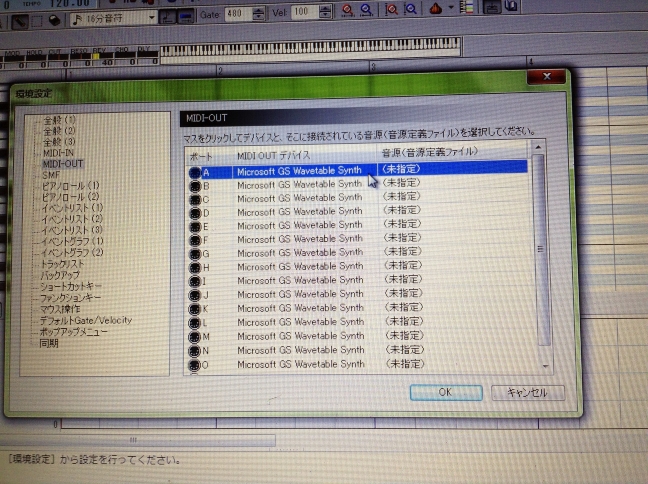
Then, go to the right pane and click on each row of the MIDI-OUT column. Each row will open up the options available, like this:

Click the OK button to exit the pop-up window and return to the main workspace of Domino 1.42.

Sunday, 8 September 2013
Cooliojazz's PMusic JAR app (UPDATED)
UPDATED:
Well, let me be frank. I tried quite a number of randomly-seeded generations. There is definitely similarity across results in terms of chord progression and rhythm pattern.
=================
http://www.omnimaga.org/index.php?PHPSESSID=8ru1nme4mcibki1moujpfkf0m2&topic=16227.msg293424#msg293424
This is one of the better procedural music generator apps I have come across to-date. (Of course, I prefer freeware apps to begin with, therefore I cannot comment on commercial music generators, as I have not purchased any yet.)
The creator of PMusic goes by the username Cooliojazz. He has made it available in the Omnimaga discussion thread linked above. The app is distributed as a Jar file, which launches and functions fine in my computers running Windows 8 (64-bit desktop) and Windows 7 (64-bit notebook).
Unfortunately, the jar file cannot be used on my iPad 5, iPod 5 nor iPhone 4. neither can it be used on my Blackberry Playbook. Why ? The answer is simple: These tablets do not run Java, which is required for Jar files.
Too Bad ! Got to generate the music using my Windows machines only !
Important note: For the sake of disambiguation, I ought to mention that the term "PMusic" has been used in so many different ways for so many different things on the internet, that I doubt any one party can claim the right to use that name. A simple Google search will return diverse results for the term "PMusic". So, always search with a second term "cooliojazz", and that gets you closer to what you want.
Well, let me be frank. I tried quite a number of randomly-seeded generations. There is definitely similarity across results in terms of chord progression and rhythm pattern.
=================
http://www.omnimaga.org/index.php?PHPSESSID=8ru1nme4mcibki1moujpfkf0m2&topic=16227.msg293424#msg293424
This is one of the better procedural music generator apps I have come across to-date. (Of course, I prefer freeware apps to begin with, therefore I cannot comment on commercial music generators, as I have not purchased any yet.)
The creator of PMusic goes by the username Cooliojazz. He has made it available in the Omnimaga discussion thread linked above. The app is distributed as a Jar file, which launches and functions fine in my computers running Windows 8 (64-bit desktop) and Windows 7 (64-bit notebook).
Unfortunately, the jar file cannot be used on my iPad 5, iPod 5 nor iPhone 4. neither can it be used on my Blackberry Playbook. Why ? The answer is simple: These tablets do not run Java, which is required for Jar files.
Too Bad ! Got to generate the music using my Windows machines only !
Important note: For the sake of disambiguation, I ought to mention that the term "PMusic" has been used in so many different ways for so many different things on the internet, that I doubt any one party can claim the right to use that name. A simple Google search will return diverse results for the term "PMusic". So, always search with a second term "cooliojazz", and that gets you closer to what you want.
Saturday, 7 September 2013
PMusic - Procedural Music Generator
PMusic - Procedural Music Generator Have not tried it out yet. Other people's output sounds pretty darn good.
some apps for me to explore for generative music
http://www.earslap.com/projectslab/circuli
http://www.earslap.com/projectslab/otomata
http://www.synthtopia.com/content/tag/generative-music/
http://discchord.com/blog/2012/3/27/two-new-generative-music-apps-now-available.html
http://adamflorin.com/work/loom/loom-a-generative-music-platform
https://play.google.com/store/apps/details?id=processing.android.orbits&hl=ja
http://www.essl.at/software.html
http://ipadproducer.com/category/generative-music-app-ipadapps/
http://ipadloops.com/tag/generative-music-app/
http://www.earslap.com/projectslab/otomata
http://www.synthtopia.com/content/tag/generative-music/
http://discchord.com/blog/2012/3/27/two-new-generative-music-apps-now-available.html
http://adamflorin.com/work/loom/loom-a-generative-music-platform
https://play.google.com/store/apps/details?id=processing.android.orbits&hl=ja
http://www.essl.at/software.html
http://ipadproducer.com/category/generative-music-app-ipadapps/
http://ipadloops.com/tag/generative-music-app/
Wolfram Tone Generator not working for me
Sadly, this procedural music generator cannot produce sound for me in IE10, nor Chrome, in Windows 8. The webpage coding must be out-of-date.
http://tones.wolfram.com/generate/
http://tones.wolfram.com/generate/
Saturday, 30 June 2012
Friday, 8 June 2012
Wednesday, 6 June 2012
Tuesday, 5 June 2012
Monday, 16 April 2012
UTAU won't do for me
Have been researching the UTAU app, but alas, it requires VB6, which is a tad out of date for current computers running windows 7, never mind the 64-bit architecture. Sigh. Too bad !!
Subscribe to:
Posts (Atom)